Showing posts with label museums. Show all posts

Sunday, 1 May 2011

Artefact 5

My aim for Artefact 5 was to create a User Interface for one of their exhibitions. However after looking at their newly designed website, with added information about their growing education section I decided to create an app that can be used for any one of their exhibits. I think that this approach is the best way to go as the app could be adapted to any exhibit that the museum may want to advertise, especially in this time of need (funds).

This is their new website http://www.thecollectionlincoln.org/usher/?page_id=43. The main page that changed the direction for my app is the Saturday workshops that they provide for 8-13 year olds. The children get to use different mediums varying from collage to paint and learn about the art work within the museum. I have created an art app that is based on their workshops on a Saturday, giving them the chance to get more involved with the gallery/ recreating artwork in both traditional and digital methods.

I have focused on how the navigation will work within the art/game app as it is a key part to how the audience will interact with the app.

The first interface is based on the art app artstart that was designed by a teacher as a way of inspiring children with different projects.

My version is basically the same concept but leads on to an art gaming challenge. I have slightly changed the navigation so that the audience can change the sub sections individually. I think changing them individually is a good idea as it will get the students to think about one medium and how it can be used in different ways to challenge their comfort zones.

Unlike art start the version I have created is designed to get the children to recreate the art work in different mediums so that they students can get more involved with the artwork therefore forming a connection with it and the museum. By recreating it they'll want to find out more about it.
Once the colour, medium and artwork has been chosen it will be summarized on a UI with the painting in full that they will then recreate on the next screen.
They have a set time to recreate the artwork. If they complete it in the set amount of time they win an art tool. All art tools won can be used at the end of the game (once they've completed all levels) to create their own artwork that has been inspired by the previous stages of the game.
The UI sums up what art tools they've won. If they choose to they can go onto the information section to learn more about the art work or move on to create they've own piece of art on a blank UI.

Once the levels have been completed the children will have the option to look at the knowledge section or...
Create their own artwork using the tools they've won from the game.

Friday, 29 April 2011

User Interface Design (revisited)

I have designed 3 UI's for the iphone. They are all based on a question/answer game using different navigation to see how I can get student of a different ages to engage with UI for learning that they don't see as a task.

This UI uses a simple touch option to select the answer. Simple, easy to use.
This is based on the same question/answer game however I have used a different navigation that gets the audience to interact with the interface a bit more. This is a typical technique used by apple.
I have added a new element into this interface to engage the audience in a simple game- guess the answer to the question before the water level goes down. The quicker the audience does this the more life they keep.
I think that the challenge now is to make sure that the game is suitable for the Usher art gallery.

Art App Development of ideas

I have tried my previous idea with an iphone interface. I am having slight problems with the adjusting to the size of the screen from designing for web, in terms of navigation. I have to be very careful where the navigation is positioned in order not to clutter up the page and ruin the UI as the audience won't be able to see the full UI to see what the game looks like.

Thursday, 28 April 2011

Story Boarding for Art Museum App

The idea of this art/game app is to get children more involved with the art work in museums. Through gaming they learn about the pieces of art work through acceding through the levels to win art tools as prizes before they run out of life. The game is quite simple so will attract most ages as they won't see if as a task they have to do.

They gain more points/tools by guessing the answer to the question before the water level is at its lowest point. I still intend to design this based on the Lincolnshire Usher art gallery exhibit.
At the final stage the 'prize' is to create a drawing with the tools that have been won. My aim to to inspire children through this art app to use techniques and expand their ideas through absorbing ideas from masters of the discipline that they have gained knowledge about by playing the game.

Monday, 21 March 2011

Art/game app story boarding

I have designed the story board for 2 prototypes for an art/game app designed for museums. I think that most museums are missing apps that work on more levels than just giving the students a digital tour and ploughing through information. I think for a museum app to be successful it needs to engage the user in a task so that they are subconsciously learning through about art through the game.

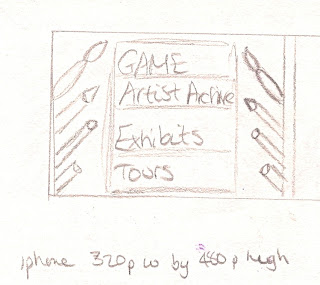
The first stage of this app is to give the user options so they can participate in the game to learn or got through the content in order to learn. I am going to design the prototype to 320w by 480 (iphone standards) to begin with as it is the most popular phone on the market and has been used the most in museums to guide people.
The idea of my first art/game app is to find the artist through a shooting game mixed in with the concept of catch phrase.

Aim of the game: Answer the questions as fast as possible so you can shoot the canvas to find out who the artist is.
The questions: Get harder with each level and are all related to the art/artist so you get clues about who they are (like catch phrase). With each correctly answered question you win a art tool that you can propel at the canvas to reveal who the artist is. Each art tool has different qualities so will hit the canvas differently.

I have based the shooting aspect of this game on angry birds as it is what the audience in the current market are attracted to.


Art detective
Aim: The idea is to solve the mystery to save the art being lost forever. The canvas is damaged and you have to answer questions to restore it and choose the missing objects. The idea is that the audience gets to know the aspects of an art piece.


Sunday, 20 March 2011

More Museum Art/Game apps...

I like this idea as a starting point for my app. It draws you into the museum app through a story. My thought is what else are art museums about apart from telling the story of where the painting originated from, who the artist is and what their story is. Although I didn't like using the app as I found the story disappointing as it just led onto some static information I think i could create an app that leads on to a game of piecing a story together. Through the game you would gain artist tools to piece together the story.

I have also looked into experimental art apps as they link to the area I am exploring, however because I am introducing point scoring to keep the user engages and giving them an goal alterior it is classed as game. http://todayinart.com/2010/03/18/experimental-art-apps-on-the-iphone/

I like the idea of Record maker. It let you create images using one finger. It has a humour factor with the images created.
I also like this app because it lets you manipulate work in the style of Joshua Davis, a digital and vector artist. I think it gives you an insight into how the artist works. This is what I want my app to do.

Tate Britain has created a kids section that includes a game section. I have looked at the detective game that gets children actively thinking about why the artwork has been created, by who and why.

I think this is a successful art/game app because it
  • uses bright graphics
  • multiple tools-zooming in etc
  • gives the children a challenge and a goal

Colour Colour: This web based game app teaches children about colour theory andd how it has developed since teh 50's. It lets you paint famous art works in the process.
Art Lab: The aim of the game is to restore an art piece of your choice. Along the way it describes for the process behind art restoration in real life.

Game possibility= a game that mimics a real life art process so that the children can learn and engage in a fun, educational game.


This game reminds me of my angry birds art app in terms of how it propels objects onto a canvas. You choose objects that make up a painting by Turner. Although it works I think it needs some more to keep the user engaged, something to aim for. Maybe a question and answer game after you've chosen the elements to be propelled onto the canvas.


http://www.ismashphone.com/2009/08/14-best-iphone-apps-for-graphic-artists-and-web-designers.html

This link (going slightly astray from my game app) has some useful links for website/ graphic designers. It has apps that send you jobs, portfolio apps, colour palette apps and even project management apps.

Friday, 18 March 2011

Augmented reality with art/museum apps


“We want to make an A.R. project with strong emphasis on user-generated content,” Mr. Wils said, referring to augmented reality. He also emphasized the importance of getting artists involved in the process. “We want to see that artists are using the technology to come up with new user experiences,” he said.

“I myself would call it an interactive participatory work of art, but it’s up for interpretation,” said Amy Heibel, the museum’s director of Web and digital media, referring to the application that lets people rearrange 38 elements of a 17th-century Dutch still life. This is referring to the museum app called 'In still life'. In my opinion it gets people involved in the work, getting them actively involved in the museums content and the work artists are producing. For example John Baldessari is an artists work who is becoming brought into the world of app and therefore exploring the art works boundaries. His work was initially about bringing text and photography into his painting but this app allows you to merge real life images into still life juxtapositions that are personal to you but done in the style of that artist.

This has given me the idea to develop my app design to incorporate an aspect allowing people to interact and recreate the artwork so that they can learn about it on a new level.

Monday, 14 March 2011

More art/game apps (in museums)

I aim to explore art/game apps within the museum field to see what the competition is and how I can create a game that children will enjoy whilst teaching them about art. Below are a range of games that I think express the different areas of art/game apps. Both of the art/game apps below are web based apps that aim to teach children art techniques or information about artists.


This is one of 4 games that allows you to experiment with different sketching techniques as Van Gogh did.


Getty games has a range of slide shows, puzzles, detective games and spot the difference to attract children to art information. This is is the metropolitan museum.


Simple matching pictures game to the title game.

ArtStart: Was developed by an art teacher in Seattle. It is an ideas generator that gives students a tool, project and colour to work in. It has proven very successful to simulate idea with students. A simple ideas ticker taken to the next level.


Animalia is a story telling game for the young artist. You have to find over a 100 items scattered throughout the artwork. A hide a seek game that can get the audience to explore the depths of the artwork. So far I like this concept the most as a story can make the artwork more intriguing rather than just straight up information.


What do think about whilst creating an art/game app for a museum:
  • In reality (if this wasn't for a uni based project) cost of development would be a factor
  • How much content to include
  • What the 'forward' thinking theme would be to attract/inform more visitors
  • The content of the app should enhance the experience of looking at it in person
  • Should raise the museums appeal to attract tech savvy people.
What have iphone apps been used for in the past?
  • Launch an app for a special exhibition.
  • Create an app for selected works rather than focus on thousands of artworks throughout the whole museum. Offer detailed information on the 'best' of the current exhibition. This is usually designed for the pieces that people are naturally attracted to any way, giving them a deeper insight (possibly before they even go to the museum).
  • A app that covers an extensive range of all the art work throughout the museum.
  • For donations/sponsorship